Robotic Process Automation: How a Bot Fits into a Workflow
November 26, 2026
Robotic process automation (RPA) uses software robots to carry out repeatable, rule-based tasks in digital applications. A bot can read records, enter information, and move data between systems, often by interacting with the same screens a person uses. RPA automates an execution task; the surrounding business workflow still needs decisions, ownership, and a defined result.
Table of Contents
Watch a robot perform one bounded task
Illustrative example: an operations team approves a supplier’s contact record in a request system. The same address must then be entered in a separate legacy application. Assume that the team has assessed the available integration options and chosen a screen-based bot for this task. This is a fictional design exercise, not a customer case or a description of a CMW connector.
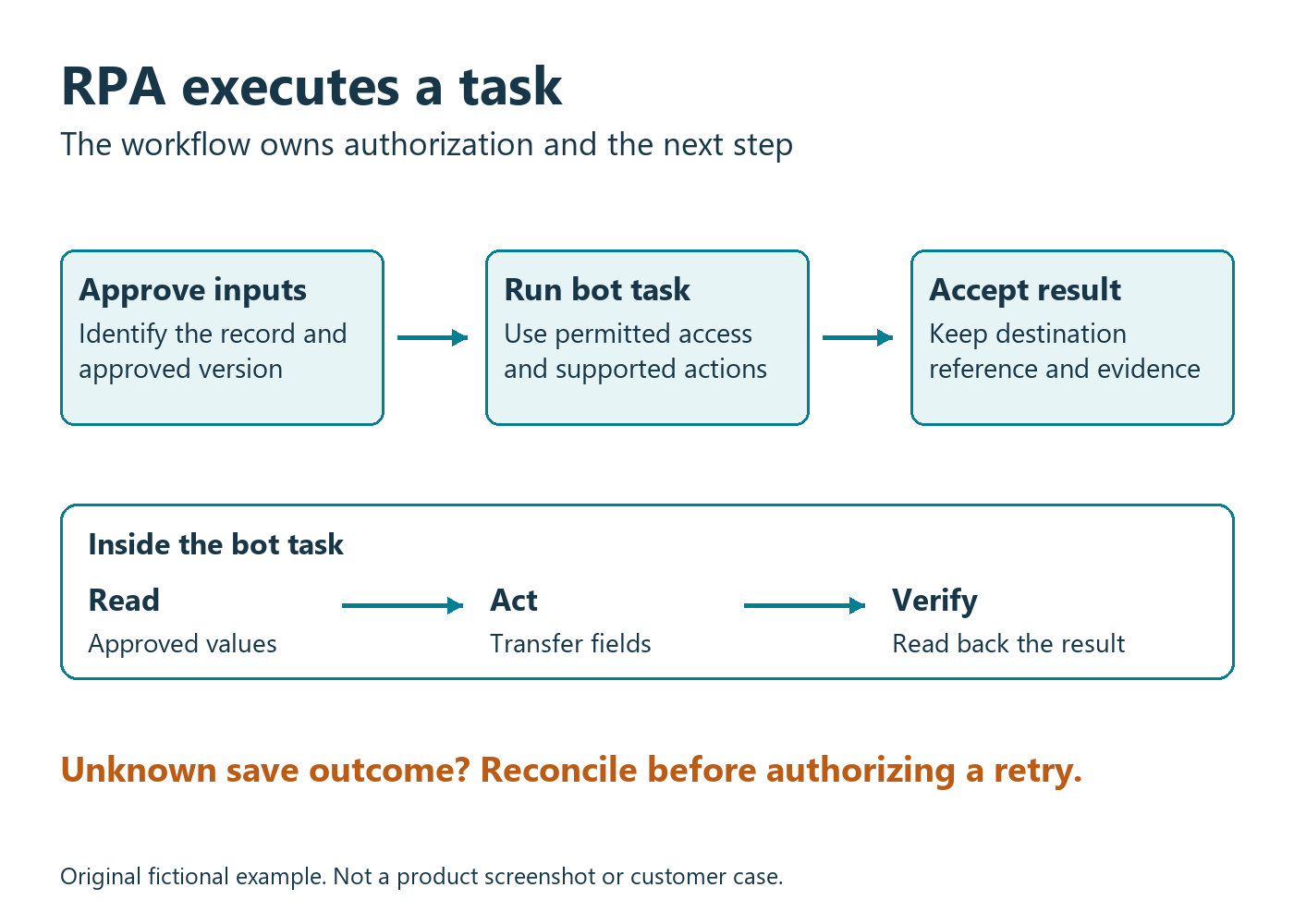
The useful unit of automation is specific: transfer the approved version of one record, verify the result, and return evidence to the requesting workflow. It is not “manage suppliers.” That broader process includes work the bot cannot decide from a few field values.
- Receive an authorized item. The bot receives a stable request identifier and the approved record version. An editable draft is not equivalent to approved input.
- Check what already exists. Search the destination using the agreed identifier. A matching name alone may not establish that two records represent the same supplier.
- Perform the permitted action. Enter the approved fields through the supported interface using the access assigned to the automation.
- Verify the saved result. Read back the destination identifier and relevant values. A clicked Save button is weaker evidence than a confirmed record.
- Report success or an exception. Return the destination reference and result to the workflow. If the outcome is uncertain, route it for reconciliation rather than silently starting again.
The bot executes the task. A workflow owner decides what authorizes it, which exceptions need a person, and what evidence allows the next step to begin.
Why the application interface matters
RPA is commonly associated with software that reproduces user actions across existing applications. Modern automation platforms may combine screen interactions, APIs, and other integrations. A bot is not defined by an absolute prohibition on APIs; the important question is how the selected task will execute and remain supportable.
IBM’s RPA overview describes both API and user-interface interactions. Compare those options for the actual application. A supported API may offer clearer responses and more stable identifiers than a screen interaction, while a legacy system may expose the required action only through its interface.
When a bot depends on screens, a changed field, unexpected dialog, expired session, or unavailable application can affect execution. Treat the interface as a maintained dependency. Record which application behavior the automation expects and who will check it after a change.
Decide whether a person starts the run
Attended RPA runs with a person’s involvement, such as an employee starting a helper while handling a request. Unattended RPA runs under a configured trigger or schedule without someone supervising every interaction. A workflow can use both approaches. Microsoft’s RPA explanation distinguishes these operating modes.
For the supplier example, an attended helper might prepare fields for an employee to confirm. An unattended bot needs a clear way to receive approved work, stop on an exception, and return its result. Calling it unattended does not remove responsibility for monitoring, access, application changes, or failed items.
RPA also does not automatically imply artificial intelligence. A bot can follow explicit rules without interpreting ambiguous documents or making open-ended decisions. If an AI component proposes values, decide separately how those values become authorized inputs. The broader combination belongs to intelligent automation.
Design the uncertain-save case before the happy path scales
Suppose the destination application stops responding just after the bot submits the contact record. The task may have failed before saving, or it may have saved successfully while the response was lost. Retrying without checking can create a duplicate or overwrite a later change.
The practical response is to keep the request reference, inspect the destination, and determine what happened before authorizing another attempt. If the bot cannot establish the outcome, a named person needs enough information to reconcile the item. “Failed” and “unknown result” should not be interchangeable statuses.
Test this alongside missing input, an existing destination record, a changed screen, an unavailable application, and a returned approval. Use nonproduction examples appropriate to the systems involved. These tests are an original evaluation checklist for the scenario; they are not a claim that every RPA product implements the same recovery controls.
Choose RPA for the task, then connect it to the workflow
A useful RPA candidate has a repeatable action, sufficiently consistent inputs, an explicit completion check, and an application interface the team can maintain. High volume can make a candidate worth investigating, but volume alone does not make an ambiguous or frequently changing task suitable.
Measure completed and reconciled items, exceptions, repeated attempts, and support effort as well as execution time. Do not count a rapid run as a successful business outcome if someone must later repair its records. Any expected savings need a baseline that includes preparation and ongoing maintenance.
The wider process automation design connects approvals, human tasks, system actions, and outcomes. RPA can perform one part of that route. It does not replace the route’s operating rules or turn every exception into an automation task.
If you are evaluating CMW workflow software, use the example to discuss the surrounding forms, assignments, and decision path. Confirm any required RPA integration separately for the proposed solution; this article does not assert a native bot or connector.

About the author
Pavel Grebeshkov
Pavel Grebeshkov has more than 15 years of experience in IT projects. His background includes CMO roles at CMW Lab and Familoop, bringing a marketing perspective to the needs of business software buyers and vendors.
He is the CEO of Softosaur, a platform for the B2B software and IT community. His articles on the CMW Lab blog focus on workflows, business processes, and the practical questions teams face when evaluating business software.