A request can spend minutes being worked on and hours waiting in an inbox. Workflow automation software can move it to the next person, check required information, and flag a missed deadline. The useful starting point is a specific handoff that needs fixing—and a clear definition of what should happen when the normal route fails.
What is workflow automation?Workflow automation is the use of software to perform defined tasks and move work between people or systems when specified events and conditions occur. It can validate submissions, assign tasks, route approvals, send notifications, and record outcomes. People still define the rules, handle exceptions, and make decisions that require judgment. Effective automation connects each action to an accountable owner and an observable result.
Key takeaways
Automate a defined process with clear inputs, owners, decision rules, and completion criteria.
A workflow can combine automated actions with human decisions; it does not need to run entirely without people.
Measure waiting time as well as working time before choosing an automation target.
Test missing information, absent approvers, duplicate events, and failed integrations before rollout.
Evaluate software by running a representative request through it, including recovery and reporting.
How workflow automation works
An automated workflow starts with an event, evaluates relevant conditions, and performs an action. For example, submitting an equipment request can trigger a check for required information. A complete request goes to the authorized approver; an incomplete request returns to the requester with a specific explanation.
Automation may execute only part of the process. Software can assign an approval task and record its outcome while a manager decides whether the purchase is justified. This distinction is consistent with IBM’s explanation of workflow automation: software may execute all or part of a process, and artificial intelligence is not required.
Workflow automation, workflow management, and BPM
Workflow management covers the design, coordination, measurement, and improvement of work. Automation implements selected actions within that arrangement. Choosing an approval rule is a management decision; applying that rule to each incoming request is a candidate for automation. See our separate introduction to workflow management for the broader concept.
Business process management (BPM) addresses how an organization designs and improves its business processes. Workflow automation is one implementation tool within that broader practice. A diagram alone does not execute work, and an automated task alone does not establish that the whole process is effective.
The Agency for Healthcare Research and Quality’s workflow assessment toolkit describes work across people and organizations, including sequential and simultaneous activities. That perspective helps avoid a common modeling mistake: showing only what happens in the application while omitting the physical work or conversation needed to complete a request.
Define the operating model before configuring software
Use this worksheet to turn a rough process idea into something a team can test.
Workflow automation operating model
Element
Decision to make
Equipment request example
Trigger
What starts one new instance?
An employee submits a request with a unique identifier.
Inputs
What information is required?
Item, business reason, department, delivery location, and required date.
Tasks
Which steps are automated or assigned to people?
Validate the form, request approval, allocate equipment, and confirm receipt.
Rules
What determines the next step?
Route by department and approval authority; return incomplete submissions.
Roles
Who owns work and exceptions?
Requester, approver, fulfillment team, and process owner.
Outputs
What proves the work is complete?
Receipt confirmed, or a documented rejection or cancellation.
Exceptions
What needs a recovery route?
Missing data, an unavailable approver, no stock, or a failed system update.
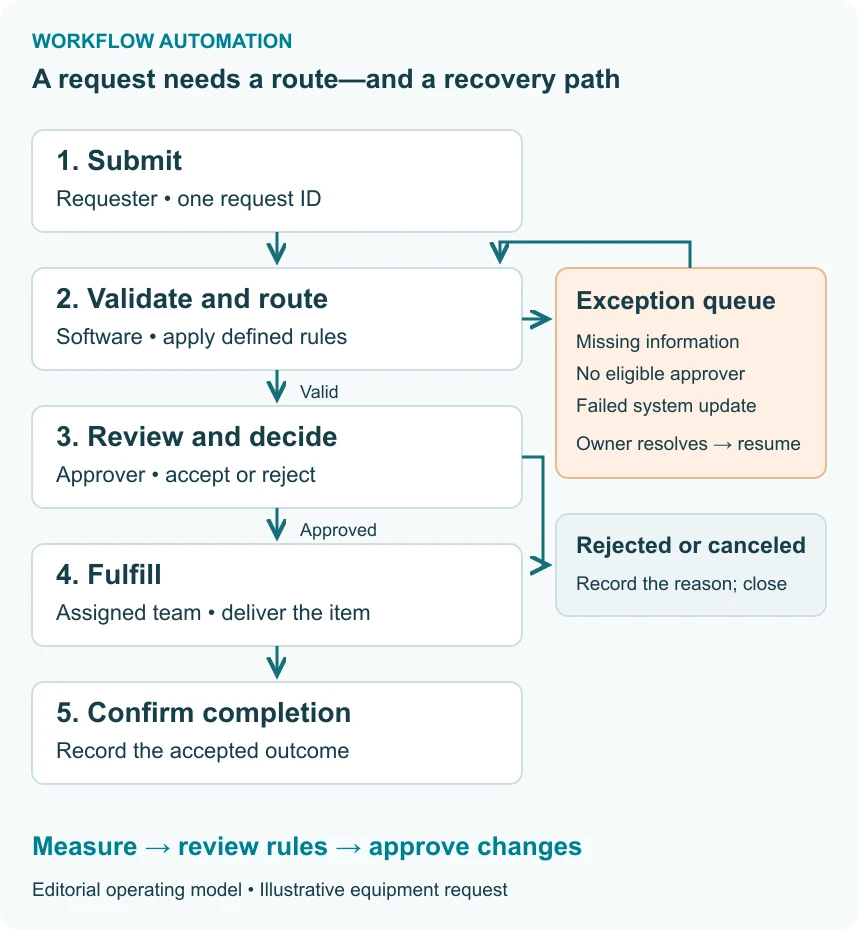
Method: This operating model is an editorial design aid developed for this guide. It is not a certification standard or a description of a preconfigured CMW Lab application.Figure 1. An automation operating model: submission, validation, approval, fulfillment, and confirmation. Rejected requests end with a recorded reason. Operational exceptions go to an owner who can resolve them and resume the appropriate step.
Keep the process owner separate from the current task assignee. The assignee handles a work item. The process owner maintains the rules, reviews performance, and resolves gaps that individual assignees cannot fix.
Four workflow automation examples
The following examples are illustrative process designs. They show what can be automated and what still needs a decision; they are not customer results or promises of functionality in every software package.
1. Finance: invoice approval
Trigger: An invoice is received with a supplier reference and amount. Route: Validate required fields, check for a possible duplicate, and assign review according to the organization’s approval policy. Human decision: Resolve disputed charges or missing supporting information. Completion: Record the approval outcome and a confirmed handoff to the payment process.
An approved invoice is not necessarily a paid invoice. Keep those states separate. If the payment-system update fails, retain the approval record and assign the integration exception instead of silently marking the invoice as paid.
2. HR: employee onboarding
Trigger: HR confirms an accepted offer and start date. Route: Create the required HR, IT, facilities, and manager tasks. Run independent tasks in parallel. Human decision: Confirm role-specific equipment and access requirements. Completion: Verify the organization’s required readiness checks.
A changed start date should update outstanding work without creating a second employee record. A canceled hire needs a cancellation route, including review of access or equipment already provisioned. The workflow owner must define which tasks are required before the overall request can close.
3. Marketing: campaign approval
Trigger: A campaign owner submits a version of the proposed material. Route: Assign brand, budget, and any required specialist reviews. Human decision: Approve the content or request changes. Completion: Record approval of the specific version that will be released.
An approval of yesterday’s draft should not authorize today’s revised claim automatically. Decide which changes require another review, keep the approved version identifiable, and prevent a late response from approving an obsolete draft.
4. IT and operations: equipment requests
Trigger: An employee requests equipment. Route: Validate the request, determine the approver, assign fulfillment, and notify the requester of progress. Human decision: Approve the need or propose an acceptable substitute. Completion: Confirm delivery or record the reason the request could not be fulfilled.
If the approver is absent, escalation should lead to a designated substitute with the required authority. Sending more reminders to an unattended inbox does not resolve the bottleneck. The next section shows how to measure this workflow.
Benefits of workflow automation—and how to measure them
Automation can reduce repeated data entry, make task ownership visible, and shorten handoffs. Treat each expected benefit as a hypothesis to test against the current process.
For example, mandatory fields may reduce incomplete submissions, but an unnecessarily long form can discourage use. Automatic routing may reduce dispatch time while leaving an understaffed fulfillment queue untouched. Access rules and history can support a control, but software alone does not establish regulatory compliance.
A workflow KPI dictionary
A key performance indicator (KPI) needs a defined start, finish, population, and time basis. The following definitions form a consistent measurement method for this guide. They are not universal benchmark targets.
Workflow KPI dictionary: definitions and measurement rules
Metric
Formula or counting rule
Measurement note
Cycle time
Completion timestamp − submission timestamp
Use the same outcome and calendar before and after automation. Report median and a tail measure, such as the 90th percentile.
Waiting time
Total time in defined waiting states
Separate queues, requester delays, and external delays. For a sequential case with exhaustive time logging, cycle time − active time gives waiting time.
SLA attainment
Requests completed by their deadline ÷ all requests due in the period × 100%
Include requests that are overdue and still open. Define cancellation and pause rules before measuring.
Rework rate
Completed requests with at least one return for correction ÷ all completed requests in the period × 100%
Count each request once; track the number of correction loops separately.
Backlog
Requests still open at a stated snapshot time
Break out age, owner, and state. A total alone can hide a small group of very old requests.
Handoffs
Transfers between defined responsible teams within each request
Count functional transfers consistently. A status update or automated message is not necessarily a handoff.
Method: Use event timestamps and agreed state definitions. Distinguish elapsed time from business hours. For parallel tasks, do not subtract the sum of everyone’s working hours from elapsed cycle time: those hours may overlap. Measure waiting states or the relevant execution path instead.
A service-level agreement (SLA) establishes an agreed service commitment. An internal target can use similar measurement rules, but label it accurately if no agreement exists. For either, specify when the clock starts, which calendar applies, and whether any waiting states pause it.
Worked example: where an equipment request loses time
Assume one request follows a sequential route on a single working day. All active and waiting intervals are recorded; there are no breaks, overlapping tasks, or paused clocks.
Illustrative equipment request event log
Event or interval
Time
Active work
Waiting
Request submitted; waiting for validation
9:00–9:30 a.m.
0 minutes
30 minutes
Intake validates the request
9:30–9:45 a.m.
15 minutes
0 minutes
Waiting for the approver
9:45–10:00 a.m.
0 minutes
15 minutes
Manager reviews and approves
10:00–10:15 a.m.
15 minutes
0 minutes
Waiting for fulfillment
10:15 a.m.–3:15 p.m.
0 minutes
300 minutes
Fulfillment delivers equipment and confirms completion
3:15–3:30 p.m.
15 minutes
0 minutes
Total
9:00 a.m.–3:30 p.m.
45 minutes
345 minutes
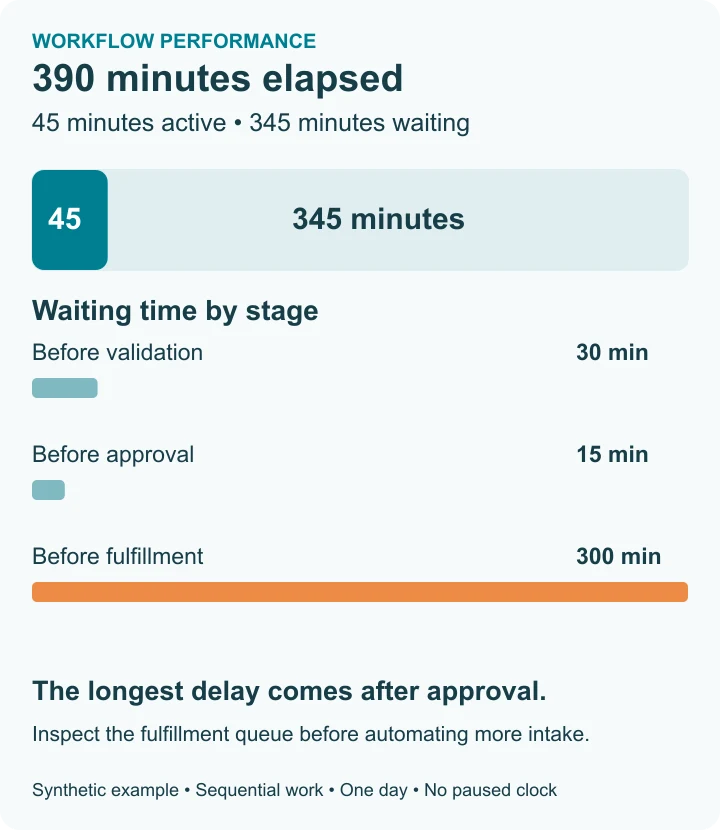
Cycle time is 390 minutes: 45 minutes of active work plus 345 minutes of waiting. The two functional handoffs are intake to the approver and the approver to fulfillment. This counting rule excludes the initial submission and final notification.
Figure 2. Illustrative equipment request, using the intervals in the table. The longest delay is the five-hour fulfillment queue. These are synthetic figures for explaining the calculation, not a CMW Lab customer result.
Automating intake might help, but the largest delay in this case occurs after approval. Investigate availability, assignment, and fulfillment capacity before promising that a faster form will solve the problem. Compare a representative group of requests before and after the change, using the same measurement boundaries.
For a separate SLA example, suppose 10 requests are due this week: eight finish on time, one finishes late, and one remains overdue. Attainment is 8 ÷ 10 × 100% = 80%. Excluding the open request would conceal a missed deadline.
How to implement workflow automation
Start with one repeatable process that has a clear owner and a measurable problem. Expand after the team can operate and recover that process reliably.
1. Establish the baseline and boundaries
Review actual completed and open requests with the people who handle them. Include rejected cases and exceptions. Record the current steps, elapsed time, rework, and manual transfers. Define the outcome you want to improve: faster approval, fewer incomplete requests, or more reliable delivery.
Choose one start event and one finish condition. If the requester needs delivered equipment, measuring only time to approval understates their experience. Agree on the decision authority before configuring the route.
2. Map the route and exceptions
Identify inputs, roles, decisions, dependencies, and recovery paths. Our workflow modeling guide explains how to make a useful diagram. When a standardized notation is appropriate, use the Object Management Group’s Business Process Model and Notation (BPMN) 2.0.2. A simpler flowchart may be sufficient for a small approval process.
Ask what happens when no rule matches, a required person is unavailable, or a request changes after approval. Give each exception a visible state, an owner, and an allowed next action.
3. Configure a bounded first version
Build the form, roles, route, conditions, and notifications for that process. Maintain a unique request identifier across connected systems. Decide which system owns each important field and how corrections are reconciled.
Low-code tools can make configuration more accessible, but integrations, permissions, and business rules still need validation. A visual designer reduces some implementation effort; it does not remove the need for process ownership.
4. Test normal work and recovery
Use representative scenarios in a safe test environment. Test a complete request, a rejection, a return for correction, an absent approver, and a failed handoff to another system. Confirm that unauthorized users cannot view or approve restricted requests.
Include a duplicate-event test: deliver the same request event twice and verify that the design prevents an unintended second order or task. This is an acceptance criterion for the implementation, not a claim that every workflow tool handles duplicates automatically.
5. Train the people who will run it
Show requesters what a complete submission looks like. Show assignees how to accept, reject, delegate, and escalate work. Give the process owner a way to inspect exceptions and identify requests that need attention.
Define a fallback for an outage, including how work recorded outside the application will be reconciled afterward. Roll out to a manageable group and collect feedback from both frequent and occasional users.
6. Compare results and govern changes
Compare the agreed KPIs with the baseline. Check whether reduced dispatch time has moved the bottleneck elsewhere. Review incomplete and abandoned requests as well as successful ones.
For each rule change, record its owner, reason, and effective date. Decide how requests already in progress will behave. A change to approval authority should not silently erase the policy under which an earlier decision was made.
Eight software features to check before you buy
Use the same request and exception scenarios in every demonstration. These checks preserve the practical purpose of a feature checklist while producing evidence you can compare.
Eight software evaluation checks
Check
What to ask the vendor to demonstrate
1. Visual workflow design
Build a route with a decision, a return for correction, and an understandable version history.
2. Usable forms
Submit and correct the request on desktop and mobile; demonstrate required fields and clear validation messages.
3. Suitable deployment and access
Explain cloud or on-premises options, supported access methods, operational responsibilities, and recovery arrangements.
4. Deadlines and SLA visibility
Show how deadlines, working calendars, pauses, and overdue requests appear to users and managers.
5. Targeted notifications
Notify the person who must act, escalate to a substitute, and avoid repeated alerts after the issue is resolved.
6. Reporting and usable history
Trace one request and reproduce a KPI from its recorded events; show how data can be exported.
7. Parallel work and completion rules
Start independent tasks together and show what happens when one is rejected, canceled, or delayed.
8. Role-based access
Demonstrate the requester, approver, administrator, and restricted-user views, including a denied action.
Method: This checklist evaluates observable behavior. A feature label is not a pass. Record the configuration, limitations, and evidence from each demonstration; do not combine unweighted scores into a claim that one product is universally best.Treat integration as an end-to-end check across the eight features. An application programming interface (API) connects software systems, but its availability alone does not establish a working integration. Test field mapping, authentication, failure recovery, duplicate prevention, and the confirmation that the destination system accepted the change.
Price the implementation as well as the subscription. Include configuration, integration, migration, training, support, and ongoing administration. Confirm licensing and limits against a written offer for your intended use; generic category prices are a poor basis for a business case.
Where AI belongs in an automated workflow
Artificial intelligence (AI) may help interpret unstructured input, suggest a category, or draft a response. Those outputs need a defined role in the process. For example, an AI-generated summary can assist an approver without becoming an approval itself.
Separate suggestions from actions that commit the organization. Decide what requires verification, which information the system may use, and who handles an uncertain or incorrect result. The NIST AI Risk Management Framework provides a voluntary framework for managing AI risks; it does not certify a workflow implementation.
A deterministic rule is often sufficient for a known threshold or routing table. Select the mechanism that fits the decision, and test it against the process requirements.
CMW Lab experience: keep people responsible for the process
“Workflow automation logic also comes from the manager”
This previously published perspective addresses a practical misconception: software can apply a routing rule, but someone still needs to decide whether that rule fits the work.
CMW Lab’s published Hertz case illustrates the coordination problem. Before: different finance and location-management units used separate Excel files. Change: Hertz selected a cloud-delivered CMW Tracker solution for capital expenditure approval work, seeking shared access to projects and flexibility for field employees. Evidence boundary: the public summary documents the problem and solution choice, but it does not quantify the resulting reduction in approval time.
The relevant implementation lesson is to connect the request, decision, owner, and outcome in one traceable process. Faster software actions alone are not evidence of a faster business result.
Frequently asked questions
What is workflow automation software?
Workflow automation software performs defined actions and routes work according to configured events and rules. It can connect forms, tasks, approvals, notifications, and records across a process. Some steps remain human decisions. Evaluate the software by testing your actual route, exceptions, permissions, and reporting requirements rather than assuming that every product supports the same behavior.
How is workflow automation different from workflow management?
Workflow automation executes selected tasks and handoffs; workflow management establishes and improves how the work should run. Management includes ownership, decision authority, measurement, and change control. A team can manage a workflow manually before automating it. It also needs to keep managing the workflow after software begins assigning tasks or applying rules.
Which workflow should a business automate first?
Start with a repeatable workflow that has a clear owner, stable decision rules, and a measurable problem. Review enough real requests to understand normal work and exceptions. A process with missing ownership or constantly disputed rules needs design work first. Select a bounded pilot whose users can test the result and provide useful feedback.
Which KPIs show whether workflow automation is working?
Measure cycle time, waiting time, deadline attainment, rework, backlog, and handoffs where they relate to your objective. Define the population, timestamps, and calendar consistently. Include overdue open work in deadline reporting. Compare equivalent periods or request groups, and check quality alongside speed so faster closure does not conceal rejected, incomplete, or prematurely closed requests.
Does workflow automation require AI or eliminate human approval?
Workflow automation does not require AI, and it can retain human approval at any necessary decision point. Rules can validate fields, route work, and trigger reminders. If AI supplies a recommendation or draft, decide how it will be checked before it affects a consequential action. The process owner remains responsible for defining that boundary.
Put one process through a realistic evaluation
Bring a real form, its approval rules, a difficult exception, and one KPI to a software discussion. Ask the team to show submission, assignment, decision, recovery, completion, and reporting for that same request.
Explore CMW Tracker workflow software to evaluate its published capabilities for visual workflow design, forms, business rules, and reporting against your process. For the broader implementation context, see how CMW Lab approaches workflow automation.
How this guide was prepared
This guide combines current public product information, primary reference sources, a previously published CMW Lab expert perspective, and an editorial operating model. The equipment request, KPI calculations, and evaluation checklist are reproducible examples, not customer benchmarks. Product capabilities should be confirmed for the proposed configuration during evaluation.